1. Overview
CUTe is a lightweight unit testing and mocking framework for C.
Unit testing is a software development practice where small units of code are tested for proper operation. The technique is carried out as part of software development process testing activities. Test-Driven Development (TDD) and Behavior-Driven Development (BDD) are well known examples of such development processes making heavy usage of unit testing.
CUTe is meant to ease the process of writing unit tests and make them suitable for test automation and regression testing activities. It is designed with the following goals in mind:
Features
test failure recovery,
extensive reporting,
flexible and modular test suite hierarchy,
strict function mocking,
JUnit XML reporting,
Test Anything Protocol reporting,
easy debugging of test failures,
clear and expressive C API,
C library dependency only.
Limitations
GNU / Linux / Glibc userspace C unit testing only
longjmp(3) based test failure recovery only
no fork(2) based test isolation
no parameterizable test support
custom check assertion not yet supported.
CUTe sources are distributed under the GNU Lesser General Public License whereas documentation manuals are distributed under the GNU General Public License.
2. Basic concepts
CUTe is a framework allowing to write, manage and run unit tests in C. It’s API provides a set of functions to :
check strongly typed data against specified constraints using test assertions;
schecule and verify mock expectations against specified constraints ;
run test cases and suites according to specified configurations ;
report test results onto the console and / or,
into files according to various specified formats.
CUTe is built as a static and / or shared library which must be linked with the user’s testing code.
Tests are organized in a hierarchical manner as shown in the example diagram below :
![digraph {
node [shape=box3d margin="0.15"]
root [label=<root<BR/><FONT COLOR="gray40"><I>«suite»</I></FONT>>]
s0 [label=<suite 0<BR/><FONT COLOR="gray40"><I>«suite»</I></FONT>>]
s1 [label=<suite 1<BR/><FONT COLOR="gray40"><I>«suite»</I></FONT>>]
node [shape=box margin="0.15"]
t0 [label=<test 0<BR/><FONT COLOR="gray40"><I>«test»</I></FONT>>]
t00 [label=<test 00<BR/><FONT COLOR="gray40"><I>«test»</I></FONT>>]
t01 [label=<test 01<BR/><FONT COLOR="gray40"><I>«test»</I></FONT>>]
t10 [label=<test 10<BR/><FONT COLOR="gray40"><I>«test»</I></FONT>>]
root -> s0
root -> t0
root -> s1
s0 -> t00
s0 -> t01
s1 -> t10
}](_images/graphviz-8a77e97795f27fcdb9739a77d75b6d470da3cb0b.png)
A test (case) implements the logic validating a single unit of code to check for proper operation.
A suite is a collection of suites and / or test cases. All suites may arbitrarily be selected for a run.
Finally, a particular run may be setup to report test results according to a specified configuration.
3. Typical Workflow
As a developper, implementing tests involves the following sequence of steps:
Preparatory phase:
write a dummy failing test case ;
setup a primary test hierarchy including a single root suite and the test just created ;
modify the test written initially to implement the first real test case ;
Iterative test implementation phases:
fix test failures ;
implement additional test case ;
when required, refine test hierarchy by defining test suites
As an integrator, you may be required to tweak test suites run configuration for proper integration within test regression / automation infrastructure.
4. Writing tests
4.1. Test case
4.1.1. Test definition
To define a test, one is expected to:
give the test a name,
provide a function / block of instructions that defines the testing logic,
Most of the time, implementing the testing logic relies upon heavy usage of test assertion.
At running time, the test function is executed with the following assumptions :
the
setup()fixture function (if any) has completed ;a timer has been armed to protect against situations where testing logic hangs ;
SIGFPE,SIGILL,SIGSEGV,SIGBUSandSIGSYSsignal(7) dispositions have been setup to catch potential testing logic exceptions / traps / crashes ;the
teardown()fixture function (if any) is always executed after test function has completed ;the test function does not alter CUTe’s internal state consistency.
As stated above, result is unpredictable when the test function alters CUTe’s internal state consistency. In particular, the test function is not allowed to :
Using the CUTE_TEST macro is the most straightforward way to define
a test:
1CUTE_TEST(sample_test)
2{
3     /* Implement testing logic here */
4}
The code sample above implements a test case named sample_test. The call to
CUTE_TEST is immediately followed by a block of instructions that
defines the related testing logic.
As not specified, no particular fixture functions are attached to the
sample_test test case, meaning that it will inherit them from its parent
suite once explicicly registered.
In addition, as no test timer is specified, it will also inherit from its parent suite timeout settings at registering time.
Just in case you need to debug the testing logic, you should remind that
the block of instructions above is used to assign the sample_test test case
a test function defined as following :
static void sample_test__cute_exec(void);
For additional flexibility, CUTe also allows to :
attach fixture functions to tests and / or suites ;
assign a timer to tests and / or suites ;
specify global test global file scope for tests and / or suites.
4.1.2. Fixture operations
A test case may be attached optional fixture operations to setup runtime preconditions and / or postconditions of the unit of code under test.
Using fixture operations brings in multiple benefits :
it enhances test repeatability since tests are executed with controlled and reproducible runtime preconditions ;
it allows for better reusability since testing logic and testing context setup may be delegated to different functions.
2 types of fixture operation are distinguished. These are implemented using
setup() and teardown() functions so that the whole test case sequence
is :
execute the
setup()function attached to test case ;if
setup()function succeeded:execute test case test function ;
execute the
teardown()function attached to test case.
else fail the test case.
The setup() function is meant to initialize the testing context to a
deterministic state whereas the teardown() function is used to restore
testing context that existed prior to setup() execution.
Use the CUTE_TEST_DEFN macro to define a fixture’d test case:
 1static void sample_setup(void)
 2{
 3     /* Initialize test case runtime context. */
 4}
 5
 6static void sample_teardown(void)
 7{
 8     /* Finalize test case runtime context. */
 9}
10
11/* `sample_fixtured_test' test case test function. */
12static void sample_fixtured_test_exec(void)
13{
14     /* Implement testing logic here */
15}
16
17/*
18 * Define `sample_fixtured_test' test case with attached setup() and
19 * teardown() fixture operations as well as default test timeout.
20 */
21static CUTE_TEST_DEFN(sample_fixtured_test,
22                      sample_fixtured_test_exec,
23                      sample_setup,
24                      sample_teardown,
25                      CUTE_DFLT_TMOUT);
Fixture functions may be specified at test case definition time using either of the following alternatives :
CUTE_NULL_SETUP, denoting an empty / NULL setup function ;CUTE_INHR_SETUP, requesting a setup fixture operation inherited from the parent suite if existing and which falls back toCUTE_NULL_SETUPotherwise ;CUTE_NULL_TEARDOWN, denoting an empty / NULL teardown function ;CUTE_INHR_TEARDOWN, requesting a teardown fixture operation inherited from the parent suite if existing and which falls back toCUTE_NULL_TEARDOWNotherwise ;the address of a custom function as mentionned above.
4.1.3. Test timeout
To protect against situations where a test case or fixture function hangs, CUTe may arm a test timer that interrupts current test case execution upon expiry. The timeout may be specified at test case definition time using one of the following C macros :
All 3 macros take a timeout setting passed as _tmout argument and which may
be specified as one of :
CUTE_DFLT_TMOUT, denoting a default timeout of 3 seconds ;CUTE_INHR_TMOUT, requesting a timeout inherited from the parent suite if existing and which falls back toCUTE_DFLT_TMOUTotherwise ;CUTE_NONE_TMOUT, to disable the timeout mechanism ;or a non-zero unsigned integer, specifying a timeout value expressed as seconds.
When the timer expires, the current test case or fixture function execution is interrupted, CUTe marks the test as failing then proceeds to the next one in sequence.
Use the CUTE_TEST_DEFN macro to specify a timeout at definition
time :
 1/* `sample_timed_test' test case test function. */
 2static void sample_timed_test_exec(void)
 3{
 4     /* Implement testing logic here */
 5}
 6
 7/*
 8 * Define `sample_timed_test' test case with an explicitly specified
 9 * timeout of 10 seconds.
10 */
11static CUTE_TEST_DEFN(sample_timed_test,
12                      sample_timed_test_exec,
13                      CUTE_NULL_SETUP,
14                      CUTE_NULL_TEARDOWN,
15                      10U);
4.1.4. Test file scope
To enhance test case reusability, CUTe allows to specify global file scope
at test definition time. 2 shorthand macros allow to minimize test developper
workload compared to CUTE_TEST_DEFN usage. These are :
CUTE_TEST_STATIC allows to define a test with static global file
scope. Registering the created test to a
suite is then restricted to the source file where the suite is defined :
 1/*
 2 * Define `sample_static_test' test case with static global file
 3 * scope.
 4 */
 5CUTE_TEST_STATIC(sample_static_test,
 6                 CUTE_INHR_SETUP,
 7                 CUTE_INHR_TEARDOWN,
 8                 CUTE_INHR_TMOUT)
 9{
10     /* Implement testing logic here */
11}
CUTE_TEST_DECL and CUTE_TEST_EXTERN macros are meant to
work with reusable definitions.
Use CUTE_TEST_EXTERN to define a test with default global file
scope, i.e. with external linkage :
 1#include "test.h"
 2
 3/*
 4 * Define `sample_extern_test' test case with default global file
 5 * scope.
 6 */
 7CUTE_TEST_EXTERN(sample_extern_test,
 8                 CUTE_INHR_SETUP,
 9                 CUTE_INHR_TEARDOWN,
10                 CUTE_INHR_TMOUT)
11{
12     /* Implement testing logic here */
13}
And use CUTE_TEST_DECL to declare the test defined above in a header
so that it may be referenced from other compilation units :
 1#ifndef _TEST_H
 2#define _TEST_H
 3
 4#include <cute/cute.h>
 5
 6/*
 7 * Declare `sample_extern_test' test case with default global file
 8 * scope.
 9 */
10extern CUTE_TEST_DECL(sample_extern_test);
11
12#endif /* _TEST_H */
As shown above, both CUTE_TEST_STATIC and CUTE_TEST_EXTERN
macros should be immediately followed by a block of instructions that defines
the related testing logic.
The block of instructions is used to define a test function which is assigned to
the created test case with the following signature scheme:
static void <test_case_name>__cute_exec(void);
Next section shows how to register test cases to suites and how to structure a complete test hierarchy.
4.2. Test hierarchy
Test hierarchy is structured around test suites. A suite is basically a container for (sub-)tests and / or (sub-)suites. Once a suite has been defined, (sub-)tests and / or (sub-)suites may be registered to it thanks to a group definition.
A test hierarchy UML class diagram would barely look like:
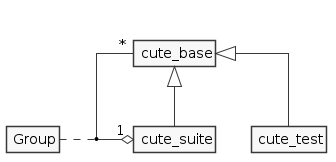
To create a test hierarchy, follow the typical workflow hereafter :
define test cases,
define a group referencing tests defined above,
define a suite based on the group defined above.
Let’s see how to define a group…
4.2.1. Group definition
A test group is basically an ordered collection of test cases and / or suites.
Using the CUTE_GROUP macro is the most straightforward way to define
a group:
 1CUTE_TEST(sample_test_0)
 2{
 3     /* Implement testing logic here */
 4}
 5
 6CUTE_TEST(sample_test_1)
 7{
 8     /* Implement testing logic here */
 9}
10
11CUTE_GROUP(sample_group) = {
12     CUTE_REF(sample_test_0),
13     CUTE_REF(sample_test_1),
14};
The code sample above defines 2 test cases respectively named sample_test_0
and sample_test_1. The call to CUTE_GROUP defines a test group
named sample_group that aggregates both test cases created above.
You may later define suite(s)
by using the variable named sample_group which itself refers to the created
group.
This test group variable is defined with static global file scope. However, for additional flexibility and reusability, CUTe also provides the following macros that allow to specify a desired global file scope :
Now that a group has been defined, let’s see how to use it to define a suite…
4.2.2. Suite definition
At running time, a suite iterates over tests and / or suites and run each one of them sequencially according to the order they are registered to it. Tests and / or suites are registered to a parent suite thanks to the group given in argument at definition time.
To define a suite, one is expected to:
Using the CUTE_SUITE macro is the most straightforward way to define
a suite:
 1CUTE_TEST(sample_test_0)
 2{
 3     /* Implement testing logic here */
 4}
 5
 6CUTE_TEST(sample_test_1)
 7{
 8     /* Implement testing logic here */
 9}
10
11CUTE_GROUP(sample_group) = {
12     CUTE_REF(sample_test_0),
13     CUTE_REF(sample_test_1)
14};
15
16CUTE_SUITE(sample_suite, sample_group);
The code sample above implements a test group named sample_group which
aggregates 2 test cases named sample_test_0 and sample_test_1
respectively.
A test suite named sample_suite is defined using the CUTE_SUITE
which is passed the sample_group test group as argument.
As not specified, no particular fixture functions are attached to the
sample_suite test suite, meaning that it will inherit them from an eventual
parent suite if explicitly registered.
In addition, as no test timer is specified, it will inherit its timeout setting from an eventual parent suite if explicitly registered.
For additional flexibility, CUTe also allows to :
attach fixture functions to suites ;
assign a timeout setting to suites ;
specify global file scope for suites.
4.2.3. Fixture inheritance
A test suite may be attached optional fixture operations to setup runtime preconditions and / or postconditions of test cases registered to it.
Important
fixture operations registered to a suite are not executed prior to / after running the suite as it would for a test case.
Suite fixture operations registering is just a mechanism allowing a test case to inherit setup() and teardown() operations from its nearest
ancestor if it requests it at definition time.
Use the CUTE_SUITE_DEFN macro to define a fixture’d test suite:
 1static int value;
 2
 3static void sample_setup(void)
 4{
 5     value = 1;
 6}
 7
 8/*
 9 * Define `sample_test_0' test case with default inherited fixture operations
10 * and timeout setting.
11 */
12CUTE_TEST(sample_test_0)
13{
14     cute_check_assert(value > 0);
15}
16
17static void sample_setup_1(void)
18{
19     value = 5;
20}
21
22/*
23 * Define `sample_test_1' test case with `sample_setup_1()` as setup()
24 * fixture operation, inherited teardown() operation and timeout
25 * setting.
26 */
27CUTE_TEST_STATIC(sample_test_1,
28                 sample_setup_1,
29                 CUTE_INHR_TEARDOWN,
30                 CUTE_INHR_TMOUT)
31{
32     cute_check_assert(value == 5);
33}
34
35CUTE_GROUP(sample_group) = {
36     CUTE_REF(sample_test_0),
37     CUTE_REF(sample_test_1)
38};
39
40/*
41 * Define `sample_fixtured_suite' test suite with attached setup() and
42 * teardown() fixture operations as well as default test timeout.
43 */
44static CUTE_SUITE_DEFN(sample_fixtured_suite,
45                       sample_group,
46                       sample_setup,
47                       CUTE_NULL_TEARDOWN,
48                       CUTE_DFLT_TMOUT);
In the example above, note how the sample_test_1 test case is attached the
sample_setup_1() function as setup() fixture operation. Conversely, the
sample_test_0 test case is defined with fixture operations inherited
from the sample_fixtured_suite test suite.
Thereby, running sample_fixtured_suite carries out the following sequence of
operations :
run
sample_test_0:execute
sample_setup()function inherited from thesample_fixtured_suitetest suite,execute
sample_setup_0test function,skip
teardown()operation thanks to theCUTE_NULL_TEARDOWNsetting inherited from thesample_fixtured_suitetest suite,
run
sample_test_1:execute
sample_setup_1(),execute
sample_test_1test function,skip
teardown()operation thanks to theCUTE_NULL_TEARDOWNsetting inherited fromsample_fixtured_suitetest suite,
Note that you may also use the following alternate macros to register fixture operations to suites :
4.2.4. Timeout inheritance
To protect against situations where a test case or fixture function hangs, CUTe may arm a test timer that interrupts current test case execution upon expiry.
As for a test case timer setting, the timeout may be specified at suite definition time using one of the following C macros :
All 3 macros take a timeout setting passed as _tmout argument and which may
be specified as one of :
CUTE_DFLT_TMOUT, denoting a default timeout of 3 seconds ;CUTE_INHR_TMOUT, requesting a timeout inherited from the parent suite if existing and which falls back toCUTE_DFLT_TMOUTotherwise ;CUTE_NONE_TMOUT, to disable the timeout mechanism ;or a non-zero unsigned integer, specifying a timeout value expressed as seconds.
Important
timer setting assigned to a suite is not applied to the suite itself as it would for a test case.
Suite timer setting assignment is just a mechanism allowing a test case to inherit timeout setting from its nearest ancestor if it requests it at definition time.
When the timer expires, the current test case or fixture function execution is interrupted, CUTe marks the test as failing then proceeds to the next one in sequence within the current suite.
Use the CUTE_SUITE_DEFN macro to specify a timeout at definition time
:
 1/*
 2 * Define `sample_test_0' test case with default inherited fixture operations
 3 * and timeout setting.
 4 */
 5CUTE_TEST(sample_test_0)
 6{
 7     cute_check_assert(0 == 0);
 8}
 9
10/*
11 * Define `sample_test_1' test case with default inherited fixture operations
12 * and assign it a timeout of 1 second.
13 */
14CUTE_TEST_STATIC(sample_test_1,
15                 CUTE_INHR_SETUP,
16                 CUTE_INHR_TEARDOWN,
17                 1U)
18{
19     cute_check_assert(1 == 1);
20}
21
22CUTE_GROUP(sample_group) = {
23     CUTE_REF(sample_test_0),
24     CUTE_REF(sample_test_1)
25};
26
27/*
28 * Define `sample_timed_suite' test suite with default fixture operations
29 * and a 10 seconds timeout.
30 */
31static CUTE_SUITE_DEFN(sample_timed_suite,
32                       sample_group,
33                       CUTE_NULL_SETUP,
34                       CUTE_NULL_TEARDOWN,
35                       10U);
In the example above, note how the sample_test_1 test case is assigned a
1 second timeout explicitly. Conversely, the sample_test_0 test case
is defined with the timeout setting inherited from the sample_timed_suite
test suite of 10 seconds.
4.2.5. Suite file scope
To enhance suite reusability, CUTe allows to specify global
file scope at suite definition time. 2 shorthand macros allow to minimize test
developper workload compared to CUTE_SUITE_DEFN usage. These are :
CUTE_SUITE_STATIC allows to define a suite with static global
file scope. Registering the created suite to
a parent one is then restricted to the source file where it is defined :
 1CUTE_GROUP(sample_group) = {
 2     /* Include a list of references to test cases or suites here. */
 3};
 4
 5/*
 6 * Define `sample_static_suite' test suite with static global file
 7 * scope.
 8 */
 9CUTE_SUITE_STATIC(sample_static_suite,
10                  sample_group,
11                  CUTE_INHR_SETUP,
12                  CUTE_INHR_TEARDOWN,
13                  CUTE_INHR_TMOUT);
CUTE_SUITE_DECL and CUTE_SUITE_EXTERN macros are meant to
work with reusable definitions.
Use CUTE_SUITE_EXTERN to define a suite with default global file
scope, i.e. with external linkage :
 1#include "test.h"
 2
 3CUTE_GROUP(sample_group) = {
 4     /* Include a list of references to test cases or suites here. */
 5};
 6
 7/*
 8 * Define `sample_extern_suite' test suite with default global file
 9 * scope.
10 */
11CUTE_SUITE_EXTERN(sample_extern_suite,
12                  sample_group,
13                  CUTE_INHR_SETUP,
14                  CUTE_INHR_TEARDOWN,
15                  CUTE_INHR_TMOUT);
And use CUTE_SUITE_DECL to declare the suite defined above in a
header so that it may be referenced from other compilation units :
1#ifndef _TEST_H
2#define _TEST_H
3
4#include <cute/cute.h>
5
6/* Declare `sample_extern_suite' test suite with external linkage. */
7extern CUTE_SUITE_DECL(sample_extern_suite);
8
9#endif /* _TEST_H */
Now that we know how to instantiate a complete test hierarchy, let’s see how to implement test functions using CUTe’s test assertions.
4.3. Test assertion
In addition to cute_skip() and cute_fail() functions, testing
logic of fixture and test case functions should rely upon testing
assertions.
These are an expressive way to verify behavior of the software under test. In
addition, while reporting failures, they provide descriptive messages to
ease the process of debugging.
Basically, a failing testing assertion interrupts current test and marks it
as failed.
The simple sample code below shows how the sample_test test case calls
such testing assertions :
 1#include <cute/cute.h>
 2#include <cute/check.h>
 3
 4static const bool           bool_var = true;
 5static const int            sint_var = -2;
 6static const unsigned short ushrt_var = 5;
 7static const void * const   ptr_var = (const void *)&sint_var;
 8static const char * const   str_var = "a test string";
 9
10CUTE_TEST(sample_test)
11{
12     /* Assert that bool_var is true */
13     cute_check_bool(bool_var, is, true);
14
15     /* Assert that sint_var > -10 */
16     cute_check_sint(sint_var, greater, -10);
17
18     /* Assert that 0 <= ushrt_var <= 10 */
19     cute_check_uint_range(ushrt_var, in, CUTE_SINT_RANGE(0U, 10U));
20
21     /* Assert that ptr_var == &sint_var */
22     cute_check_ptr(ptr_var, equal, (const void *)&sint_var);
23
24     /* Assert that str_var string ends with "string" */
25     cute_check_str(str_var, end, "string");
26}
27
28CUTE_GROUP(sample_group) = {
29     CUTE_REF(sample_test),
30};
31
32CUTE_SUITE(sample_suite, sample_group);
Testing assertions are called using functions which name begins with
cute_check_. Note how all assertion function signatures shown above take 3
arguments where :
first argument must hold the variable to test,
second argument is a literal indicating which testing operation / comparison to perform,
third argument hold the reference variable used to compare the first argument with.
Refer to the API guide to find documentation about available types of testing assertions :
Finally, the more versatile cute_check_assert() testing assertion is
also available at the expense of less descriptive failure messages :
 1#include <cute/cute.h>
 2#include <cute/check.h>
 3
 4static const int sint_var = -2;
 5
 6CUTE_TEST(sample_test)
 7{
 8     /* Assert that sint_var > -10 */
 9     cute_check_assert(sint_var > -10);
10}
In addition to standard testing assertions, CUTe also provides mocking expectations. These are described in the next section.
4.4. Mocking
CUTe also provides the ability to test software that has external dependencies (such as system or external library calls for example) according to a mocking strategy. The purpose of mocking is to isolate the code being tested by emulating the behavior and / or state of external dependencies. This allows to focus on software under test and not on dependencies.
CUTe allows to replace dependencies by emulation code carefully crafted to control inputs and outputs of software under test. Emulation is implemented using so-called mock expectations. An expectation is a 2 steps verification process. First step schedules a testing assertion before executing a piece of software under test. Scheduled assertions are then verified in a differed manner during software under test execution.
CUTe implements mock expectations according to a strict strategy. Expectations are scheduled in a First-In First-Out manner. An expectation verification failure interrupts the current test case and marks it as failed. A test case based upon mock expectations is marked as passed only when all of their respective verifications resolve to passed.
To ensure proper function calls ordering, use Call expectations as shown below :
 1#include <cute/cute.h>
 2#include <cute/expect.h>
 3
 4static void
 5external_callee_first(void)
 6{
 7     cute_mock_call();
 8}
 9
10static void
11external_callee_second(void)
12{
13     cute_mock_call();
14}
15
16static void
17code_to_test(void)
18{
19     external_callee_first();
20     external_callee_second();
21}
22
23CUTE_TEST(sample_call_order_test)
24{
25     /*
26      * Ensure that code_to_test() calls external_callee_first()
27      * first ...
28      */
29     cute_expect_call(external_callee_first);
30     /* ... then external_callee_second(). */
31     cute_expect_call(external_callee_second);
32
33     /* Run the software under test. */
34     code_to_test();
35}
36
37CUTE_GROUP(sample_group) = {
38     CUTE_REF(sample_call_order_test)
39};
40
41CUTE_SUITE(sample_suite, sample_group);
To check function parameter values, use Parameter expectations as shown below :
 1#include <cute/cute.h>
 2#include <cute/expect.h>
 3
 4static void
 5external_callee(int first, const char * second)
 6{
 7     cute_mock_sint_parm(first);
 8     cute_mock_str_parm(second);
 9}
10
11static void
12code_to_test(void)
13{
14     external_callee(0, "zero");
15}
16
17CUTE_TEST(sample_parm_test)
18{
19     /*
20      * Ensure that code_to_test() calls external_callee() with 0 as
21      * first argument ...
22      */
23     cute_expect_sint_parm(external_callee, first, equal, 0);
24     /* and a string that begins with "ze" as second argument. */
25     cute_expect_str_parm(external_callee, second, begin, "ze");
26
27     /* Run the software under test. */
28     code_to_test();
29}
30
31CUTE_GROUP(sample_group) = {
32     CUTE_REF(sample_parm_test)
33};
34
35CUTE_SUITE(sample_suite, sample_group);
To program function return codes, use Return value expectations as shown below :
 1#include <stdbool.h>
 2#include <cute/cute.h>
 3#include <cute/expect.h>
 4
 5static int
 6external_callee(void)
 7{
 8     static int sum = 0;
 9
10     sum += (int)cute_mock_sint_retval();
11
12     return sum;
13}
14
15static int
16code_to_test(void)
17{
18     int sum;
19
20     sum = external_callee();
21     sum += external_callee();
22
23     return sum;
24}
25
26CUTE_TEST(sample_retval_test)
27{
28     /*
29      * Schedule 2 integer values to be returned by
30      * external_callee().
31      */
32     cute_expect_sint_retval(external_callee, 1);
33     cute_expect_sint_retval(external_callee, 2);
34
35     /*
36      * Run the software under test and ensure it returns the sum of
37      * the 2 integer values above.
38      */
39     cute_check_sint(code_to_test(), equal, 3);
40}
41
42CUTE_GROUP(sample_group) = {
43     CUTE_REF(sample_retval_test)
44};
45
46CUTE_SUITE(sample_suite, sample_group);
Finally, standard assertion failures may be verified using Assertion expectations.
4.5. Running tests
Once a test hierarchy has been defined, some additional glue code is required to instantiate and operate it. To alleviate test developper workload, CUTe provides a single macro to use as main entry point replacement that implements all the required glue code.
Finally, you should compile and link the test code to provide a standalone executable.
Where you need more flexibility, CUTe’s API also exposes functions required to instantiate and operate a test hierarchy step by step. See section Low-level runner for more informations.
4.5.1. Main entry point
The CUTE_MAIN macro implements all the required steps to run a
test hierarchy.
It should be used as a replacement for a test hierarchy runner executable’s
main() entry point :
 1#include <cute/cute.h>
 2
 3CUTE_TEST(my_first_failing_test)
 4{
 5     cute_fail(NULL);
 6}
 7
 8CUTE_GROUP(my_first_group) = {
 9     CUTE_REF(my_first_failing_test)
10};
11
12CUTE_SUITE(my_first_suite, my_first_group);
13
14CUTE_MAIN(my_first_suite, "My first package", "0.1")
The code shown above implements a runnable test hierarchy composed of a single
root test suite my_first_suite aggregating a single test case named
my_first_failing_test.
See CUTE_MAIN description for details about its argument list.
Building this test code should produce an executable supporting the following features :
show informations about selectable subsets of the test hierarchy,
produce test reports according to specified format(s),
according to options given on the command line as described in section Command line.
Basically, in addition to command line arguments parsing, CUTE_MAIN
makes use of functions publicly exposed by CUTe API to implement
its internal logic. These are described in the following sections…
4.5.2. Low-level runner
Basically, to instantiate and operate a test hierarchy step by step :
4.5.2.1. Setting up runner
Any usage of CUTe’s library must :
begin with a call to
cute_init()to initialize API internals,finish with a call to
cute_fini()to close API I/O streams and release allocated resources.
 1#include <cute/cute.h>
 2#include <stdlib.h>
 3
 4int main(void)
 5{
 6     int                err;
 7     struct cute_config config = CUTE_CONFIG_INIT;
 8
 9     if (cute_init(&config, "My first package", "0.1"))
10             return EXIT_FAILURE;
11
12     /* Do something with CUTe... */
13
14     cute_fini();
15
16     return err ? EXIT_FAILURE : EXIT_SUCCESS;
17}
In the example show above, API is initialized thanks to a call to
cute_init() which is passed :
as first argument, a default run configuration referenced by
config;as second argument, the name of the package for which testing code is written ;
and the package version string as third argument.
The config variable is initialized using the CUTE_CONFIG_INIT
macro to configure the way the test hierarchy will run using default settings.
These settings are stored into a cute_config structure which
basically allows to :
select subset(s) of a test hierarchy to run,
setup
debug mode,and test reporting.
Finally, cute_fini() function is called to flush and close test
hierarchy reporting I/O streams and release API resources allocated
internally.
4.5.2.2. Running suites
Once CUTe’s API is setup with a run
configuration, running a test hierarchy is
straightforward :
 1#include <cute/cute.h>
 2#include <stdlib.h>
 3
 4extern CUTE_SUITE_DECL(my_first_suite);
 5
 6int main(void)
 7{
 8     int                err;
 9     struct cute_config config = CUTE_CONFIG_INIT;
10
11     if (cute_init(&config, "My first package", "0.1"))
12             return EXIT_FAILURE;
13
14     err = cute_run_suite(&my_first_suite);
15
16     cute_fini();
17
18     return err ? EXIT_FAILURE : EXIT_SUCCESS;
19}
The code above shows how to run the test hierarchy which top-level suite is
my_first_suite using a call to cute_run_suite().
While running, progress is shown according to configuration given at setup time.
See report section for explanations about displayed informations.
4.5.2.3. Listing suites
Alternatively, you may display informations about the my_first_suite test
hierarchy as shown below :
 1#include <cute/cute.h>
 2#include <stdlib.h>
 3
 4extern CUTE_SUITE_DECL(my_first_suite);
 5
 6int main(void)
 7{
 8     int                err;
 9     struct cute_config config = CUTE_CONFIG_INIT;
10
11     if (cute_init(&config, "My first package", "0.1"))
12             return EXIT_FAILURE;
13
14     cute_show_suite(&my_first_suite);
15
16     cute_fini();
17
18     return EXIT_SUCCESS;
19}
Calling the cute_show_suite() function above displays informations
according to the configuration given at
setup time.
Refer to report section for explanations about displayed informations.
4.5.3. Building tests
Basically, building a test hierarchy runner executable requires to compile and link testing code compilation units with CUTe’s library. You may choose to link against either the static library or the shared one.
Here is basic Makefile examples for building a my_first_tests
runner executable against shared and static libraries respectively.
1CUTE_PREFIX     := /usr/local
2CUTE_INCLUDEDIR := ${CUTE_PREFIX}/include
3CUTE_LIBDIR     := ${CUTE_PREFIX}/lib
4
5CFLAGS          := -I${CUTE_INCLUDEDIR}
6LDFLAGS         := -L${CUTE_LIBDIR} -lcute
7
8my_first_tests: my_first_tests.c
9     ${CC} -o $@ $< ${CFLAGS} ${LDFLAGS}
 1CUTE_PREFIX     := /usr/local
 2CUTE_INCLUDEDIR := ${CUTE_PREFIX}/include
 3CUTE_LIBDIR     := ${CUTE_PREFIX}/lib
 4
 5CFLAGS          := -I${CUTE_INCLUDEDIR}
 6LDFLAGS         := -L${CUTE_LIBDIR} \
 7                   -Wl,--push-state,-Bstatic -lcute -Wl,--pop-state
 8
 9my_first_tests: my_first_tests.c
10     ${CC} -o $@ $< ${CFLAGS} ${LDFLAGS}
In addition, as CUTe is shipped with its own pkg-config metadata files, you may either choose to make use of handcoded flags as shown above, or to retrieve build flags through pkg-config tool instead.
You will find below 2 Makefile examples for building the same runner executable against shared and static libraries respectively using the pkg-config tool.
1PKG_CONFIG := pkg-config
2CFLAGS     := ${shell ${PKG_CONFIG} --cflags libcute}
3LDFLAGS    := ${shell ${PKG_CONFIG} --libs libcute}
4
5my_first_tests: my_first_tests.c
6     ${CC} -o $@ $< ${CFLAGS} ${LDFLAGS}
 1PKG_CONFIG := pkg-config
 2CFLAGS     := ${shell ${PKG_CONFIG} --static --cflags libcute}
 3LDFLAGS    := ${shell ${PKG_CONFIG} --static \
 4                                    --libs-only-L \
 5                                    --libs-only-other libcute} \
 6              -Wl,--push-state,-Bstatic \
 7              ${shell ${PKG_CONFIG} --static --libs-only-l libcute} \
 8              -Wl,--pop-state
 9
10my_first_tests: my_first_tests.c
11     ${CC} -o $@ $< ${CFLAGS} ${LDFLAGS}
4.5.4. Command line
building a test hierarchy runner using CUTE_MAIN as main()
entry point replacement should produce an executable that allows to run tests
and / or suites according to arguments given on the command line.
Unless command line arguments parsing was modified by the test developper, the
produced executable should behave like what is shown for the fictional
sample-test program hereafter.
SYNOPSIS
DESCRIPTION
When the show argument is given, test hierarchy is listed according to
the specified PATTERN.
When the run argument is given, test hierarchy is executed according
to the specified PATTERN. Process exits with an error status if
one of the tests failed or crashed.
Finally, the -h and --help options as well as the
help argument displays a help message.
OPTIONS
- -d, --debug
Run in debug mode without neither exception handling nor timeouts.
This may be useful when running a test hierarchy under a debugger (see test case section).
- -h, --help
Output a help message.
- -s, --silent
Silence all suites and tests console output.
-s,--silent,-t,--terse,-v, and--verboseoptions are exclusive.
- -t[<COLOR>], --terse[=<COLOR>]
Enable minimal suites and tests console output.
-s,--silent,-t,--terse,-v, and--verboseoptions are exclusive.
- -v[<COLOR>], --verbose[=<COLOR>]
Enable verbose suites and tests console output.
-s,--silent,-t,--terse,-v, and--verboseoptions are exclusive.
- -x[<PATH>], --xml[=<PATH>]
Generate output to <
PATH> according to JUnit XML format.
- -a[<PATH>], --tap[=<PATH>]
Generate output to <
PATH> according to Test Anything Protocol format.
- COLOR
Controls the colorization of console output. When
on, it enforces colorization whereas it disables it whenoff.By default, colorization is automatically enabled if current terminal supports it.
5. Test reports
Test results are output into reports where, for each test case or suite, you may find usefull informations about test outcomes. A more in-depth explanation about results may be found into section test result.
Reporting may occur onto terminal and / or may be stored into files. Multiple reporting formats are supported :
console output formats allow progress monitoring ;
JUnit XML allows the recording of test results ;
Test Anything Protocol allows the streaming and recording of test results.
Reporting formats may be selected thanks to :
a programmatic scheme allowing to setup a test hierarchy runner using handcoded settings ;
or through command line arguments when a runner implementation is based upon the CUTE_MAIN API macro.
Note
Console output may be coupled with the ability to report results into files according to JUnit XML and / or TAP formats. See Command line section for more informations.
5.1. Console
Console reports show general progress informations as well as details about test failures onto standard streams. See section statistics for explainations about output details.
Console reporting may output progress informations in 3 different ways : terse, verbose or silent.
5.1.1. Terse
When unspecified, Terse is the default console output format. It shows :
a progress bar (on
stderr),failed test details with fully qualified test names (on
stdout),and overall test result statistics at end of run (on
stdout).
The following command requests the cute-full-sample executable shipped
with CUTe to produce terse console output in addition to generating a
JUnit XML report into full_sample_junit.xml
file :
$ cute-full-sample -t -xfull_sample_junit.xml run
This command should display something like :
##################  Running CUTe full sample 1.0 test(s)  ###################

root_suite::fail_suite::fail_3 ......................................... fail
issue:  exec failed
reason: assertion check failed
source: /mnt/devel/greg/tidor/cute/sample/full.c:25
caller: fail()
assert: 0 == 1

root_suite::fail_suite ................................................. fail
issue:  exec failed
reason: descendants failed
source: /mnt/devel/greg/tidor/cute/sample/full.c:143

root_suite::root_fail .................................................. fail
issue:  exec failed
reason: explicit fail requested
source: /mnt/devel/greg/tidor/cute/sample/full.c:33
caller: request_fail()
detail: example of an explicit fail request

root_suite ............................................................. fail
issue:  exec failed
reason: descendants failed
source: /mnt/devel/greg/tidor/cute/sample/full.c:158

NAME               STAT  TIME(s.us)  #PASS  #SKIP  #FAIL  #EXCP  #EXEC #TOTAL
root_suite         fail    4.334139      3      1      2      0      6      6
                                       50%    16%    33%     0%   100%
   pass_suite      pass    1.279061      5      0      0      0      5      5
                                      100%     0%     0%     0%   100%
   pass_skip_suite pass    1.256189      3      2      0      0      5      5
                                       60%    40%     0%     0%   100%
   fail_suite      fail    1.021692      2      1      1      0      4      4
                                       50%    25%    25%     0%   100%
-----------------------------------------------------------------------------
Total              fail    4.334139     11      4      2      0     17     17
                                       64%    23%    11%     0%   100%

                     ###           SUMMARY           ###
                     ###  2/17 (11%) test(s) FAILED  ###
Note
Terse console output may also be requested in a programmatic way by
enabling CUTE_CONFIG_TERSE_REPORT into
cute_config.reports.
5.1.2. Verbose
Verbose console outputs informations in a hierarchical manner and shows :
passed, skipped and disabled test statuses,
failed and crashed test details,
and overall test result statistics at end of run.
The following command requests the cute-full-sample executable shipped
with CUTe to produce verbose console output in addition to generating a
TAP report into full_sample.tap
file :
$ cute-full-sample -v -afull_sample.tap run
This command should display something like :
##################  Running CUTe full sample 1.0 test(s)  ###################

       NAME                                                   TIME(s.us) STAT
[  0%] root_suite
[  0%]    pass_suite
[  0%]       pass_1 ........................................    0.250116 pass
[  4%]       pass_2 ........................................    0.250113 pass
[  9%]       pass_3 ........................................    0.250114 pass
[ 14%]       pass_4 ........................................    0.250114 pass
[ 19%]       pass_5 ........................................    0.250115 pass
[ 28%]    pass_suite .......................................    1.349725 pass
[ 28%]    pass_skip_suite
[ 28%]       pass_1 ........................................    0.250113 pass
[ 33%]       pass_2 ........................................    0.250116 pass
[ 38%]       skip_3 ........................................    0.250124 skip
[ 42%]       pass_4 ........................................    0.250113 pass
[ 47%]       skip_5 ........................................    0.250116 skip
[ 57%]    pass_skip_suite ..................................    1.350395 pass
[ 57%]    fail_suite
[ 57%]       pass_1 ........................................    0.250115 pass
[ 61%]       skip_2 ........................................    0.250120 skip
[ 66%]       fail_3 ........................................    0.250099 fail
issue:  exec failed
reason: assertion check failed
source: /mnt/devel/greg/tidor/cute/sample/full.c:25
caller: fail()
assert: 0 == 1
[ 71%]       pass_4 ........................................    0.250110 pass
[ 80%]    fail_suite .......................................    1.092241 fail
issue:  exec failed
reason: descendants failed
source: /mnt/devel/greg/tidor/cute/sample/full.c:143
[ 80%]    root_pass ........................................    0.250111 pass
[ 85%]    root_skip ........................................    0.250121 skip
[ 90%]    root_fail ........................................    0.250115 fail
issue:  exec failed
reason: explicit fail requested
source: /mnt/devel/greg/tidor/cute/sample/full.c:33
caller: request_fail()
detail: example of an explicit fail request
[100%] root_suite ..........................................    4.620629 fail
issue:  exec failed
reason: descendants failed
source: /mnt/devel/greg/tidor/cute/sample/full.c:158

NAME               STAT  TIME(s.us)  #PASS  #SKIP  #FAIL  #EXCP  #EXEC #TOTAL
root_suite         fail    4.620629      3      1      2      0      6      6
                                       50%    16%    33%     0%   100%
   pass_suite      pass    1.349725      5      0      0      0      5      5
                                      100%     0%     0%     0%   100%
   pass_skip_suite pass    1.350395      3      2      0      0      5      5
                                       60%    40%     0%     0%   100%
   fail_suite      fail    1.092241      2      1      1      0      4      4
                                       50%    25%    25%     0%   100%
-----------------------------------------------------------------------------
Total              fail    4.620629     11      4      2      0     17     17
                                       64%    23%    11%     0%   100%

                     ###           SUMMARY           ###
                     ###  2/17 (11%) test(s) FAILED  ###
Note
Verbose console output may also be requested in a programmatic way by
enabling CUTE_CONFIG_VERB_REPORT into
cute_config.reports.
5.1.3. Silent
As its name suggests, silent console produces no output (except for internal CUTe errors).
The following command requests the cute-full-sample executable shipped
with CUTe to produce silent console output in addition to generating a
JUnit XML report into full_sample_junit.xml
file :
$ cute-full-sample -s --xml=full_sample_junit.xml run
Note
Silent console output may also be requested in a programmatic way by
enabling CUTE_CONFIG_SILENT_REPORT into
cute_config.reports.
5.1.4. Statistics
Terse and verbose console reports show an overall test results sumup at end of run where test hierarchy results are aggregated and presented in a hierarchical manner on a per suite basis. Here is an excerpt of examples shown in previous sections :
 1NAME               STAT  TIME(s.us)  #PASS  #SKIP  #FAIL  #EXCP  #EXEC #TOTAL
 2root_suite         fail    4.334139      3      1      2      0      6      6
 3                                       50%    16%    33%     0%   100%
 4   pass_suite      pass    1.279061      5      0      0      0      5      5
 5                                      100%     0%     0%     0%   100%
 6   pass_skip_suite pass    1.256189      3      2      0      0      5      5
 7                                       60%    40%     0%     0%   100%
 8   fail_suite      fail    1.021692      2      1      1      0      4      4
 9                                       50%    25%    25%     0%   100%
10-----------------------------------------------------------------------------
11Total              fail    4.334139     11      4      2      0     17     17
12                                       64%    23%    11%     0%   100%
13
14                     ###           SUMMARY           ###
15                     ###  2/17 (11%) test(s) FAILED  ###
Lines 2 to 9 above show for each suite, 2 rows of informations according to a tabular format which is depicted in the table below.
Column name |
Description |
First row |
Second row |
|---|---|---|---|
NAME |
name of suite |
short name |
empty |
STAT |
result status |
status abbreviation |
empty |
TIME |
run time elapsed |
|
empty |
#PASS |
number of direct descendants passed |
absolute value |
ratio computed as \(\frac{\#PASS\times100}{\#EXEC}\) |
#SKIP |
number of direct descendants skipped |
absolute value |
ratio computed as \(\frac{\#SKIP\times100}{\#EXEC}\) |
#FAIL |
number of direct descendant failures |
absolute value |
ratio computed as \(\frac{\#SKIP\times100}{\#EXEC}\) |
#EXCP |
number of direct descendant crashes (exceptions) |
absolute value |
ratio computed as \(\frac{\#EXCP\times100}{\#EXEC}\) |
#EXEC |
number of direct descendants executed, (not off) |
absolute value |
ratio computed as \(\frac{\#EXEC\times100}{\#TOTAL}\) |
#TOTAL |
total number of direct descendants registered. |
absolute value |
empty |
Report is completed by lines 11 and 12 which present overall aggregated test result statistics. Note that values displayed here account for test case related results ONLY, i.e., suites are excluded from computation.
 1NAME               STAT  TIME(s.us)  #PASS  #SKIP  #FAIL  #EXCP  #EXEC #TOTAL
 2root_suite         fail    4.334139      3      1      2      0      6      6
 3                                       50%    16%    33%     0%   100%
 4   pass_suite      pass    1.279061      5      0      0      0      5      5
 5                                      100%     0%     0%     0%   100%
 6   pass_skip_suite pass    1.256189      3      2      0      0      5      5
 7                                       60%    40%     0%     0%   100%
 8   fail_suite      fail    1.021692      2      1      1      0      4      4
 9                                       50%    25%    25%     0%   100%
10-----------------------------------------------------------------------------
11Total              fail    4.334139     11      4      2      0     17     17
12                                       64%    23%    11%     0%   100%
13
14                     ###           SUMMARY           ###
15                     ###  2/17 (11%) test(s) FAILED  ###
This is the reason why, given a particular column, the sum of absolute values found at lines 2 to 9 may differ from absolute value found at line 11.
5.2. JUnit XML
Reports may be generated according to JUnit XML format. As stated onto Testmo’s junitxml Github :
The JUnit XML file format has been made popular by the JUnit and has since become the de facto standard format to exchange test results between tools. JUnit-style XML files are generated by countless testing frameworks and are processed by CI tools, build servers and test management software to read and display test results.
There is no official specification for the JUnit XML file format and various tools generate and support different flavors of this format. The goal of this project here is to document a common set of elements, attributes and conventions supported by many tools2. If you are building software that produces or consumes JUnit-style XML files, this project might be a good starting point to learn about the format.
JUnit XML format is quite descriptive and allows the recording of test results for long-term statistical analysis. In addition, it allows for merging test results from multiple files across multiple test hierarchies.
The following command requests the cute-full-sample executable shipped
with CUTe to produce JUnit XML output onto the console :
$ cute-full-sample -x run
The above command should display something like what is shown below. For more informations about the format itself and how to understand it, see Testmo’s junitxml README.
<?xml version="1.0" encoding="UTF-8"?>

<testsuite name="root_suite"
           failures="2"
           errors="0"
           skipped="4"
           tests="17"
           disabled="0"
           time="4.296857"
           package="CUTe full sample"
           classname="CUTe full sample"
           version="1.0"
           timestamp="2023-08-02T15:51:54+00:00"
           hostname="gregdesk"
           file="/mnt/devel/greg/tidor/cute/sample/full.c"
           line="158">
    <testsuite name="pass_suite"
               failures="0"
               errors="0"
               skipped="0"
               tests="5"
               disabled="0"
               time="1.271822"
               package="CUTe full sample"
               classname="root_suite"
               version="1.0"
               id="0"
               timestamp="2023-08-02T15:51:54+00:00"
               hostname="gregdesk"
               file="/mnt/devel/greg/tidor/cute/sample/full.c"
               line="116">
        <testcase name="pass_1"
                  classname="root_suite::pass_suite"
                  status="passed"
                  time="0.250117"
                  timestamp="2023-08-02T15:51:54+00:00"
                  file="/mnt/devel/greg/tidor/cute/sample/full.c"
                  line="36" />
        <testcase name="pass_2"
                  classname="root_suite::pass_suite"
                  status="passed"
                  time="0.250114"
                  timestamp="2023-08-02T15:51:55+00:00"
                  file="/mnt/devel/greg/tidor/cute/sample/full.c"
                  line="42" />
        <testcase name="pass_3"
                  classname="root_suite::pass_suite"
                  status="passed"
                  time="0.250115"
                  timestamp="2023-08-02T15:51:55+00:00"
                  file="/mnt/devel/greg/tidor/cute/sample/full.c"
                  line="48" />
        <testcase name="pass_4"
                  classname="root_suite::pass_suite"
                  status="passed"
                  time="0.250116"
                  timestamp="2023-08-02T15:51:55+00:00"
                  file="/mnt/devel/greg/tidor/cute/sample/full.c"
                  line="54" />
        <testcase name="pass_5"
                  classname="root_suite::pass_suite"
                  status="passed"
                  time="0.250078"
                  timestamp="2023-08-02T15:51:55+00:00"
                  file="/mnt/devel/greg/tidor/cute/sample/full.c"
                  line="60" />
    </testsuite>
    <testsuite name="pass_skip_suite"
               failures="0"
               errors="0"
               skipped="2"
               tests="5"
               disabled="0"
               time="1.261026"
               package="CUTe full sample"
               classname="root_suite"
               version="1.0"
               id="1"
               timestamp="2023-08-02T15:51:56+00:00"
               hostname="gregdesk"
               file="/mnt/devel/greg/tidor/cute/sample/full.c"
               line="130">
        <testcase name="pass_1"
                  classname="root_suite::pass_skip_suite"
                  status="passed"
                  time="0.250068"
                  timestamp="2023-08-02T15:51:56+00:00"
                  file="/mnt/devel/greg/tidor/cute/sample/full.c"
                  line="36" />
        <testcase name="pass_2"
                  classname="root_suite::pass_skip_suite"
                  status="passed"
                  time="0.250086"
                  timestamp="2023-08-02T15:51:56+00:00"
                  file="/mnt/devel/greg/tidor/cute/sample/full.c"
                  line="42" />
        <testcase name="skip_3"
                  classname="root_suite::pass_skip_suite"
                  status="skipped"
                  time="0.250134"
                  timestamp="2023-08-02T15:51:56+00:00"
                  file="/mnt/devel/greg/tidor/cute/sample/full.c"
                  line="72">
            <skipped message="exec skipped">
                reason: explicit skip requested
                source: /mnt/devel/greg/tidor/cute/sample/full.c:17
                caller: skip()
            </skipped>
        </testcase>
        <testcase name="pass_4"
                  classname="root_suite::pass_skip_suite"
                  status="passed"
                  time="0.250116"
                  timestamp="2023-08-02T15:51:56+00:00"
                  file="/mnt/devel/greg/tidor/cute/sample/full.c"
                  line="54" />
        <testcase name="skip_5"
                  classname="root_suite::pass_skip_suite"
                  status="skipped"
                  time="0.250117"
                  timestamp="2023-08-02T15:51:57+00:00"
                  file="/mnt/devel/greg/tidor/cute/sample/full.c"
                  line="78">
            <skipped message="exec skipped">
                reason: explicit skip requested
                source: /mnt/devel/greg/tidor/cute/sample/full.c:17
                caller: skip()
            </skipped>
        </testcase>
    </testsuite>
    <testsuite name="fail_suite"
               failures="1"
               errors="0"
               skipped="1"
               tests="4"
               disabled="0"
               time="1.009939"
               package="CUTe full sample"
               classname="root_suite"
               version="1.0"
               id="2"
               timestamp="2023-08-02T15:51:57+00:00"
               hostname="gregdesk"
               file="/mnt/devel/greg/tidor/cute/sample/full.c"
               line="143">
        <testcase name="pass_1"
                  classname="root_suite::fail_suite"
                  status="passed"
                  time="0.250114"
                  timestamp="2023-08-02T15:51:57+00:00"
                  file="/mnt/devel/greg/tidor/cute/sample/full.c"
                  line="36" />
        <testcase name="skip_2"
                  classname="root_suite::fail_suite"
                  status="skipped"
                  time="0.250117"
                  timestamp="2023-08-02T15:51:57+00:00"
                  file="/mnt/devel/greg/tidor/cute/sample/full.c"
                  line="66">
            <skipped message="exec skipped">
                reason: explicit skip requested
                source: /mnt/devel/greg/tidor/cute/sample/full.c:17
                caller: skip()
            </skipped>
        </testcase>
        <testcase name="fail_3"
                  classname="root_suite::fail_suite"
                  status="failure"
                  time="0.250119"
                  timestamp="2023-08-02T15:51:57+00:00"
                  file="/mnt/devel/greg/tidor/cute/sample/full.c"
                  line="84">
            <failure message="exec failed">
                reason: assertion check failed
                source: /mnt/devel/greg/tidor/cute/sample/full.c:25
                caller: fail()
                assert: 0 == 1
            </failure>
        </testcase>
        <testcase name="pass_4"
                  classname="root_suite::fail_suite"
                  status="passed"
                  time="0.250110"
                  timestamp="2023-08-02T15:51:58+00:00"
                  file="/mnt/devel/greg/tidor/cute/sample/full.c"
                  line="54" />
    </testsuite>
    <testcase name="root_pass"
              classname="root_suite"
              status="passed"
              time="0.250115"
              timestamp="2023-08-02T15:51:58+00:00"
              file="/mnt/devel/greg/tidor/cute/sample/full.c"
              line="90" />
    <testcase name="root_skip"
              classname="root_suite"
              status="skipped"
              time="0.250120"
              timestamp="2023-08-02T15:51:58+00:00"
              file="/mnt/devel/greg/tidor/cute/sample/full.c"
              line="96">
        <skipped message="exec skipped">
            reason: explicit skip requested
            source: /mnt/devel/greg/tidor/cute/sample/full.c:17
            caller: skip()
        </skipped>
    </testcase>
    <testcase name="root_fail"
              classname="root_suite"
              status="failure"
              time="0.250118"
              timestamp="2023-08-02T15:51:58+00:00"
              file="/mnt/devel/greg/tidor/cute/sample/full.c"
              line="102">
        <failure message="exec failed">
            reason: explicit fail requested
            source: /mnt/devel/greg/tidor/cute/sample/full.c:33
            caller: request_fail()
            detail: example of an explicit fail request
        </failure>
    </testcase>
</testsuite>
Note
JUnit XML console output may also be requested in a programmatic way by
enabling CUTE_CONFIG_XML_REPORT into
cute_config.reports.
5.3. TAP
Reports may also be generated according to Test Anything Protocol format version 14. As stated onto TAP home page :
TAP, the Test Anything Protocol, is a simple text-based interface between testing modules in a test harness. It decouples the reporting of errors from the presentation of the reports.
One of its major uses is for noise reduction; when you have a suite of many tests, making them TAP producers and using a TAP consumer to view them helps ensures that you will see everything you need to notice and diagnose breakage without being distracted by a flood of irrelevant success messages. It can assist other forms of analysis and statistics-gathering as well.
TAP started life as part of the test harness for Perl but now has implementations in C, C++, Python, PHP, Perl, Java, JavaScript, Go, Rust, and others. Consumers and producers do not have to be written in the same language to interoperate.
TAP format is suitable for both test result streaming and storage. Streaming may be usefull when spawing tests remotely and one wants to monitor test suites progress. On the other hand, the results storage ability is required for long-term statistical analysis.
The following command requests the cute-full-sample executable shipped
with CUTe to produce TAP output onto the console :
$ cute-full-sample -a run
The above command should display something like what is shown below. For more informations about the format itself and how to understand it, see TAP specification v14.
TAP version 14
1..6
# Subtest: pass_suite
    1..5
    ok 1 - pass_1
      ---
      duration_ms: 250.117558
      ...
    ok 2 - pass_2
      ---
      duration_ms: 250.113843
      ...
    ok 3 - pass_3
      ---
      duration_ms: 250.115644
      ...
    ok 4 - pass_4
      ---
      duration_ms: 250.112682
      ...
    ok 5 - pass_5
      ---
      duration_ms: 250.124600
      ...
ok 1 - pass_suite
  ---
  duration_ms: 1354.906506
  ...
# Subtest: pass_skip_suite
    1..5
    ok 1 - pass_1
      ---
      duration_ms: 250.113948
      ...
    ok 2 - pass_2
      ---
      duration_ms: 250.116428
      ...
    ok 3 - skip_3 # SKIP exec skipped: explicit skip requested
      ---
      source: /mnt/devel/greg/tidor/cute/sample/full.c:17
      caller: skip()
      duration_ms: 250.125943
      ...
    ok 4 - pass_4
      ---
      duration_ms: 250.093096
      ...
    ok 5 - skip_5 # SKIP exec skipped: explicit skip requested
      ---
      source: /mnt/devel/greg/tidor/cute/sample/full.c:17
      caller: skip()
      duration_ms: 250.121722
      ...
ok 2 - pass_skip_suite
  ---
  duration_ms: 1350.303347
  ...
# Subtest: fail_suite
    1..4
    ok 1 - pass_1
      ---
      duration_ms: 250.118092
      ...
    ok 2 - skip_2 # SKIP exec skipped: explicit skip requested
      ---
      source: /mnt/devel/greg/tidor/cute/sample/full.c:17
      caller: skip()
      duration_ms: 250.120104
      ...
    not ok 3 - fail_3
      ---
      severity: failure
      message: exec failed
      reason: assertion check failed
      source: /mnt/devel/greg/tidor/cute/sample/full.c:25
      caller: fail()
      assert: 0 == 1
      duration_ms: 250.121183
      ...
    ok 4 - pass_4
      ---
      duration_ms: 250.114225
      ...
not ok 3 - fail_suite
  ---
  severity: failure
  message: exec failed
  reason: descendants failed
  source: /mnt/devel/greg/tidor/cute/sample/full.c:143
  duration_ms: 1092.704318
  ...
ok 4 - root_pass
  ---
  duration_ms: 250.113013
  ...
ok 5 - root_skip # SKIP exec skipped: explicit skip requested
  ---
  source: /mnt/devel/greg/tidor/cute/sample/full.c:17
  caller: skip()
  duration_ms: 250.145972
  ...
not ok 6 - root_fail
  ---
  severity: failure
  message: exec failed
  reason: explicit fail requested
  source: /mnt/devel/greg/tidor/cute/sample/full.c:33
  caller: request_fail()
  detail: example of an explicit fail request
  duration_ms: 250.132877
  ...
Note
TAP console output may also be requested in a programmatic way by
enabling CUTE_CONFIG_TAP_REPORT into
cute_config.reports.
5.4. Test result
For each test case or suite, result is reported using multiple kinds of informations. These are described below.
- status
A synthetic state depicting the outcome of a test or suite ; possible statuses are :
pass : a test case or suite passed entirely ;
skip : a test case or suite was skipped programmatically, i.e thanks to a call to
cute_skip();fail : a test case failed or a suite has at least one failed or crashed sub-test / sub-suite ; may also happen when
cute_fail()is called explicitly ;excp : a test case crashed or all sub-tests / sub-suites of a suite crashed ;
off : a test case has been deselected or all sub-tests / sub-suites of a suite have been deselected because of an unsuccessful regular expression matching (see
command line test selectionandprogrammatic test selection).
- issue
The nature of a particular test event, i.e. what happened.
- reason
Basically explain why a particular test issue happened.
- source
Source code location where a particular test assertion is called or a test case or suite is defined; expressed as
pathname:line.
- caller
Name of the function that called a particular test assertion.
There are additional types of reported informations that are specific to the failing test assertion that procuded them.